Showing posts with label iPod. Show all posts

Monday, 3 June 2013

Siri Knows You’re A Dirty Cheater At Video Games [Easter Egg]


siricheatcodes3

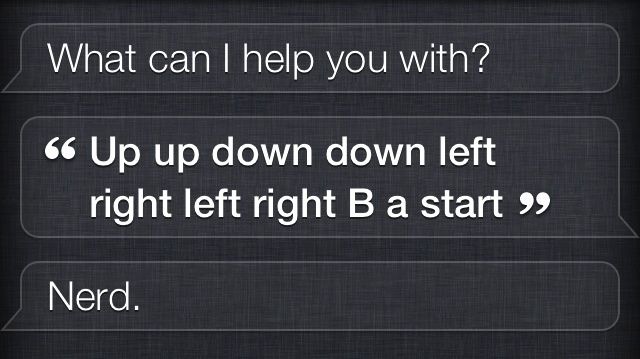
Siri knows everything (kind of). She even knows when you’re trying to use the Konami Code to cheat your way towards world domination.

In a newly discovered Siri Easter egg, if you try to give Siri the Konami Code (up, up, down, down, left, right, left, right, B, A, start), she’ll chide you for your cheating ways.

Here are two other responses you can get in the Easter egg: 

siricheatcodes
siricheatcodes21

Thursday, 30 May 2013

Apple Releases New 16GB iPod touch With 4-inch Retina Display, No iSight Camera, Discontinues 4th-Generation Model

We are used to seeing Apple holding large press and media events, with the intention of generating the maximum interest possible for any new hardware launch. But it seems that the relatively silent launch of the new 16GB iPod touch has passed by without any fuss coming from Cupertino campus. The immediate release of a 16GB variant of the fifth-generation iPod touch may have taken a few by surprise, especially considering the timing is only a few weeks shy of Apple’s annual WWDC, but it serves as a replacement for the fourth-generation 16GB model that remained on sale when the larger 4-inch iPod touch 5G was announced last year.

As you might expect, the latest addition to the iPod touch lineup comes with a full 4-inch Retina display to compliment the existing 32 and 64GB models. Prospective purchasers of the smaller capacity fifth-generation model will benefit from the embedded dual-core A5 processor that ships with the media player as well as redesigned Apple EarPods that were heavily featured in the announcement keynote last year.

ipodtouch-16-gallery1-2013

The good news is that the new device is available immediately through the online Apple Store at a cost of $229. However, those cost-savings seem to come at a price with the trade-off being that the 4-inch personal media player will only be available with black and slate aesthetics. We’ve previously been used to only getting our iOS devices in either black or white, but last year’s introduction of multiple color choices for the iPod touch certainly proved to be popular amongst younger music lovers.

new iPod touch specs

Apple has also made a number of amendments to the technical specifications of the cheaper device. The forward facing camera has made it through the design process but it seems like the rear 1080p capable camera has been removed as part of the process of keeping costs at a minimum. It seems that this latest iOS device launch is aimed at the budget end of the market and could be specifically targeted at those who want to get their hands on their first iOS device without having to part with too much cash – cue the speculation about a budget iPhone!

new iPod touch

The latest model iPod touch is available to purchase now from Apple’s online store and should be hitting physical retail outlets in the coming days.

You can follow us by "like" our Facebook page to keep yourself updated on all the latest from Microsoft, Google, Apple and the web.

How To Check iPhone Warranty Status Online

The Apple iPhone is a very expensive gadget to own, and so stands to reason, then, that repairs would also cost more than your average device. The value of having a warranty system in place in the event of a problem can never be underestimated, and with the iPhone benefiting from the one-year manufacturer’s cover, those who’ve recently purchased an iPhone can, in the circumstance of hardware / software failure, head over to Apple for a repair.

If you’re unsure as to whether your iPhone has any kind of warranty with Apple, and would like to find out either because your device is broken, or just for peace of mind, then a little-known automated service on the official Apple site will help you do so.


billboard_iphone_hero

As well as just catering to the iPhone, it also covers any piece of Apple hardware you may own. So if you want to check a MacBook, iMac, iPad or iPod touch, it’s pretty easy to get started:

Step 1: Navigate to the Web address:


Step 2: You’ll be met with a dialog box which requires you to type in your device’s serial number. Now, depending on what piece of hardware you own, it could be anywhere, but as a rule of thumb, it’s usually found somewhere on the back. For example, on the MacBook Air, it’s underneath your machine just above the FCC logo. If you’re still struggling, there’s a link just underneath the box offering help on how you can locate it.

Photo 06-04-2013 5 30 39 PM


Step 3: Once you’ve typed in the alphanumeric code, one of two things will happen.
  • If your purchase date cannot be validated, you will need to type in the date you bought your Apple device from the store. If the date is not provided accurately, you will need to go through the system, as prompted, to submit your proof of purchase.

  • If your purchase has been validated, you will be provided with all kinds of useful information, including whether your Telephone Technical Support and Repairs and Service Coverage are active, and when they are going to expire, or have expired. You will also be notified as to whether you can extend your warranty through the AppleCare program.

Photo 06-04-2013 5 30 45 PM

So, there you have it. Some of you will probably have already been aware of this process, but for those who weren’t, you can now make any necessary provisions to ensure you are adequately protected.

You can follow us by "like" our Facebook page to keep yourself updated on all the latest from Microsoft, Google, Apple and the web.