Showing posts with label IPod Touch. Show all posts

Monday, 3 June 2013

AltKeyboard Will Turn You Into A More Efficient iPhone Typist [Jailbreak]


It takes practice to learn how to efficiently type on the iOS keyboard. Because all the keys are virtual, you have to tab through multiple layouts to access all of the available characters. I remember how slow I was at alternating keyboards to type numbers and punctation when I got my first iPhone. Over time, muscle memory kicks in and it becomes second nature.

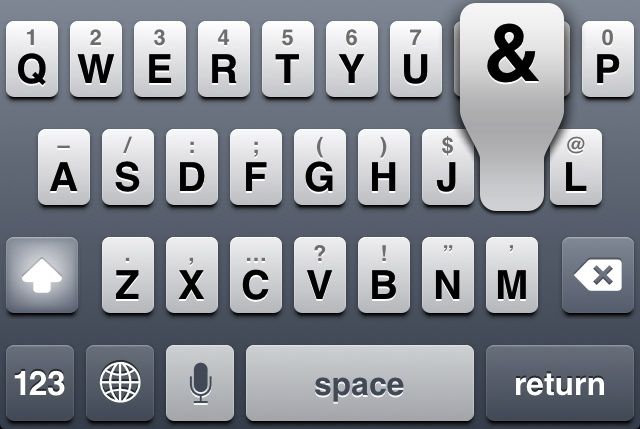
What if there was a more productive way to type on iOS? A new jailbreak tweak called AltKeyboard is a fantastic enhancement every iPhone typist needs.

AltKeyboard
No layout switching required.
Alternate keys are available by quickly swiping up on a main key. You don’t have to switch layouts to access the numerical keys; the most used options are all available on the same layout.

There are two options that can be enabled in the tweak’s preferences. Tapping “Flick up” switches the gesture to a slide, which I found to be a little more tricky than the default. You can also tap “Alternate key” to enable the shift key layout. Instead of numbers and punctation, flicking up on a key products its capital version. Like the flick or slide gesture, choosing either layout is purely a matter of preference. I found that the default flick up and alternate key layout suited my needs perfectly.

AltKeyboard is designed by Sentry, a prolific jailbreak tweak and concept designer we’ve featured numerous times. Like his other work, this tweak is a great example of how subtle, focused changes can really improve the iOS experience.

AltKeyboard is available now in Cydia for $1. Get it.

You can follow us by "like" our Facebook page to keep yourself updated on all the latest from Microsoft, Google, Apple and the web.

Thursday, 30 May 2013

How To Check iPhone Warranty Status Online

The Apple iPhone is a very expensive gadget to own, and so stands to reason, then, that repairs would also cost more than your average device. The value of having a warranty system in place in the event of a problem can never be underestimated, and with the iPhone benefiting from the one-year manufacturer’s cover, those who’ve recently purchased an iPhone can, in the circumstance of hardware / software failure, head over to Apple for a repair.

If you’re unsure as to whether your iPhone has any kind of warranty with Apple, and would like to find out either because your device is broken, or just for peace of mind, then a little-known automated service on the official Apple site will help you do so.


billboard_iphone_hero

As well as just catering to the iPhone, it also covers any piece of Apple hardware you may own. So if you want to check a MacBook, iMac, iPad or iPod touch, it’s pretty easy to get started:

Step 1: Navigate to the Web address:


Step 2: You’ll be met with a dialog box which requires you to type in your device’s serial number. Now, depending on what piece of hardware you own, it could be anywhere, but as a rule of thumb, it’s usually found somewhere on the back. For example, on the MacBook Air, it’s underneath your machine just above the FCC logo. If you’re still struggling, there’s a link just underneath the box offering help on how you can locate it.

Photo 06-04-2013 5 30 39 PM


Step 3: Once you’ve typed in the alphanumeric code, one of two things will happen.
  • If your purchase date cannot be validated, you will need to type in the date you bought your Apple device from the store. If the date is not provided accurately, you will need to go through the system, as prompted, to submit your proof of purchase.

  • If your purchase has been validated, you will be provided with all kinds of useful information, including whether your Telephone Technical Support and Repairs and Service Coverage are active, and when they are going to expire, or have expired. You will also be notified as to whether you can extend your warranty through the AppleCare program.

Photo 06-04-2013 5 30 45 PM

So, there you have it. Some of you will probably have already been aware of this process, but for those who weren’t, you can now make any necessary provisions to ensure you are adequately protected.

You can follow us by "like" our Facebook page to keep yourself updated on all the latest from Microsoft, Google, Apple and the web.