Showing posts with label cydia tweak. Show all posts

Monday, 3 June 2013

AltKeyboard Will Turn You Into A More Efficient iPhone Typist [Jailbreak]


It takes practice to learn how to efficiently type on the iOS keyboard. Because all the keys are virtual, you have to tab through multiple layouts to access all of the available characters. I remember how slow I was at alternating keyboards to type numbers and punctation when I got my first iPhone. Over time, muscle memory kicks in and it becomes second nature.

What if there was a more productive way to type on iOS? A new jailbreak tweak called AltKeyboard is a fantastic enhancement every iPhone typist needs.

AltKeyboard
No layout switching required.
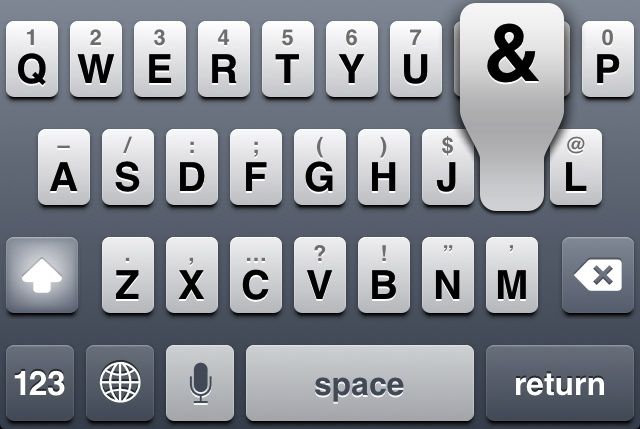
Alternate keys are available by quickly swiping up on a main key. You don’t have to switch layouts to access the numerical keys; the most used options are all available on the same layout.

There are two options that can be enabled in the tweak’s preferences. Tapping “Flick up” switches the gesture to a slide, which I found to be a little more tricky than the default. You can also tap “Alternate key” to enable the shift key layout. Instead of numbers and punctation, flicking up on a key products its capital version. Like the flick or slide gesture, choosing either layout is purely a matter of preference. I found that the default flick up and alternate key layout suited my needs perfectly.

AltKeyboard is designed by Sentry, a prolific jailbreak tweak and concept designer we’ve featured numerous times. Like his other work, this tweak is a great example of how subtle, focused changes can really improve the iOS experience.

AltKeyboard is available now in Cydia for $1. Get it.

You can follow us by "like" our Facebook page to keep yourself updated on all the latest from Microsoft, Google, Apple and the web.

Tuesday, 28 May 2013

The Badger Cydia Tweak Touches Down On The BigBoss Repo: View Notifications Right From Your Homescreen [VIDEO]

Yet again, another anticipated tweak people been looking forward to was released today called Badger. It was developed by Aehmlo Lxaitn and Brett Schuster and is now available in Cydia’s BigBoss repo for $0.99.
Badger allows users to view notifications by using its default activation method by swiping up on an app icon displaying a badge kind of like Velox. Upon swiping up on an icon a nice pop-up menu will appear containing your unread messages and allows users to delete individual notifications from the interface by swiping to the left, or reveal the entire notification by tapping on it.
This will invoke a scrolling process which is a little slow and users will notice when deleting a specific notification from the Badger window they wont be deleted from the app, nor will the number decrease from the applications badge. There are other activation methods like Tap an App Badge which will be discussed later.
Badger cydia tweak ijailbreak
If you experience an application with a badge or unread notification and invoking the Badger window doesn’t work go to Settings/ Notifications/ tap on the application you want and make sure the Badge App Icon toggle is switched to on.
Badger cydia tweak
Badger comes with plenty of nice options to customize the tweak. Users have a killswitch, five different animated styles for entering and exiting the Badger pop up interface and in addition there is a contacts picture toggle for interacting with apps that might have pictures displayed.
Badger cydia tweak settings
There are other advanced options such as changing the default activation method from swiping up on an icon to Swiping Down Icon, Double Tap Icon and Tap App Badge. The Double Tapp Icon method takes longer to launch an app and the Tap an App Badge might require a little practice because you need to tap the right spot. Multiple Activation Dismiss allows you to use the same activation method used to activate Badger to dismiss Badger, and Switch Action Page changes the swipe direction of Badger’s action page. Finally, disable for apps allows you to disable Badger for specific apps.
I think it’s a pretty cool idea to interact with your app’s notifications and hopefully we will see some improvement in new versions. It seems like the developers are devoted to the tweak and the user experience. Lets us know what you think of the Badger tweak below in the comment section.
Make sure you stay subscribed through our social media feeds, so that you never miss a beat, by liking us on Facebook

The Background Manager Cydia Tweak Brings True Backgrounding To iOS

Although iOS does have multi-tasking thanks to the introduction of the App Switcher it does not truly background applications, rather it suspends them in memory. This does make them more accessible, but it requires the applications essentially re-load themselves when you launch them again.
Apple did this because if enabled true multitasking then the battery life of your iPhone, iPod Touch or iPad would surely suffer, but sometimes it would be nice if true multitasking was an option for certain applications. If you were thinking the same then you will be glad to know a Cydia tweak to enable true backgrounding has been released calledBackground Manager.
The Background Manager Cydia tweak has been built from the ground up for iOS 6 and should not be confused with the Backgrounder Cydia tweak that was available on previous firmware generations. Background Manager was coded from scratch and does not use source code from Backgrounder.
Background-Manager-Cydia-Tweak-ijailbreak
When you install Background Manager from Cydia you will have to configure it. This can be done from the Settings app. Inside the preferences tab for Background Manager you will find two panels: Global and Each App. In the Global panel you will be able to set rules for how backgrounding works for all applications on your device and in the Each App tab you can configure rules on an app-to-app basis.
The nice thing about Background Manager is when you configure rules on an app-to-app basis there is additional settings that are quite useful such as the ability to make an application launch as soon as you boot your device.
Background-Manager-Cydia-Tweak-ios-ijailbreak
As mentioned previously there is some concerns with battery life with Background Manager as it means applications are always running as if you were viewing them at that moment, but if you only use it for certain applications it shouldn’t be much of a problem.
If you are interested in Background Manager you can find it on the BigBoss repo for $0.99. Let us know what you think of the tweak in the comments section below.
Make sure you stay subscribed through our social media feeds, so that you never miss a beat, by liking us on Facebook

Set Activator Actions When Double Tapping Applications On Your Homescreen With App Activate

App Activate is a new tweak that was released into Cydia recently and what it does is allow you to assign Activator actions by double tapping an app’s icon. This is more useful than you might think and it opens up to some really cool possibilities.
For example, with App Activate you could set it so that when you double tap the Music app it starts playing or when you double tap the Mail app you could compose an email.
Getting the picture yet?
If you have Ask Assistant installed you could even make it so when you double tap the Maps icon it would automatically ask Siri to take you home, or make it so when you double tap the Weather app Siri would tell you the current weather forecast.
App-Activate-Cydia-Tweak-ijailbreak
Configuring App Activate is extremely easy and involves you going into the App Activate tab in the Settings app and selecting the applications you want to apply double tap gestures to. Then once you select the applications you go into Activator and assign an activator action to those applications.
I have tested App Activate and it works very well! It certainly adds some useful functionality and considering it is available for free in the BigBoss repo, there is nothing stopping you from trying it out.
Let us know what you think of the tweak in the comments section below.
Make sure you stay subscribed through our social media feeds, so that you never miss a beat, by liking us on Facebook

New Tweak Promises To Amplify Your iPhone’s Speaker By 200% [Jailbreak]


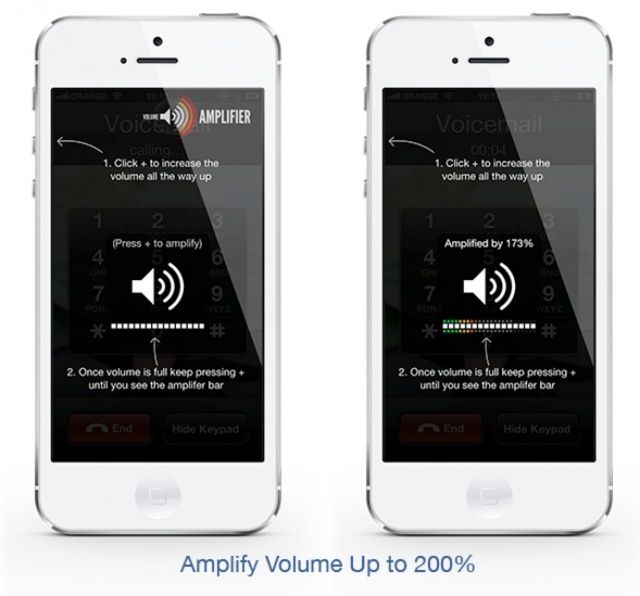
       The iPhone 5’s call speaker is pretty good, but there are times when it could be a little louder — like when you’re in a crowded place. As always, the jailbreak community has a solution to that problem. It’s called Volume Amplifier, and it’s a new tweak that promises to amplify your iPhone’s call speaker volume by 200%.

   Volume Amplifier isn’t the first jailbreak tweak that promises to make your iPhone louder, but its creator claims it’s different to the others. Rather than just editing a configuration file on your iPhone to make your speaker a little louder, this tweak actually amplifies the audio stream.

     Once installed, Volume Amplifier will allow you to increase your iPhone’s speaker volume way past the limit set by Apple. Once you hit 100%, just keep pressing the volume up button to go further; Volume Amplifier will display colored a colored indicator alongside Apple’s default volume indicator to show you how far you’re going.

   Volume Amplifier will amplify your iPhone’s audio by 200%, so it’s great when you need to hold phone calls in busy places and you cannot hear the person on the other end. Because it only works with your iPhone’s call speaker, however, that’s pretty much all it’s good for.

     The tweak won’t alter the volume of your iPhone’s main speaker, so it won’t make your music, movies, or games any louder. That’s a massive shame, because I think that’s what most people would use a tweak like this for. But if you think your iPhone’s call speaker isn’t loud enough, this could be the solution.

     Volume Amplifier is currently compatible with the iPhone 5 only, however, its developer has told ModMyi that support for the iPhone 4 and iPhone 4S will be added if there’s enough demand for it. You’ll find the tweak in Cydia’s BigBoss repo now, and it’s priced at $1.99.